
🚀 System Deployment Guide
WealthFam is a containerized microservice ecosystem designed to run on any Docker-compatible infrastructure, from local Raspberry Pi servers to professional cloud platforms like Fly.io.
🏗️ Deployment Architecture
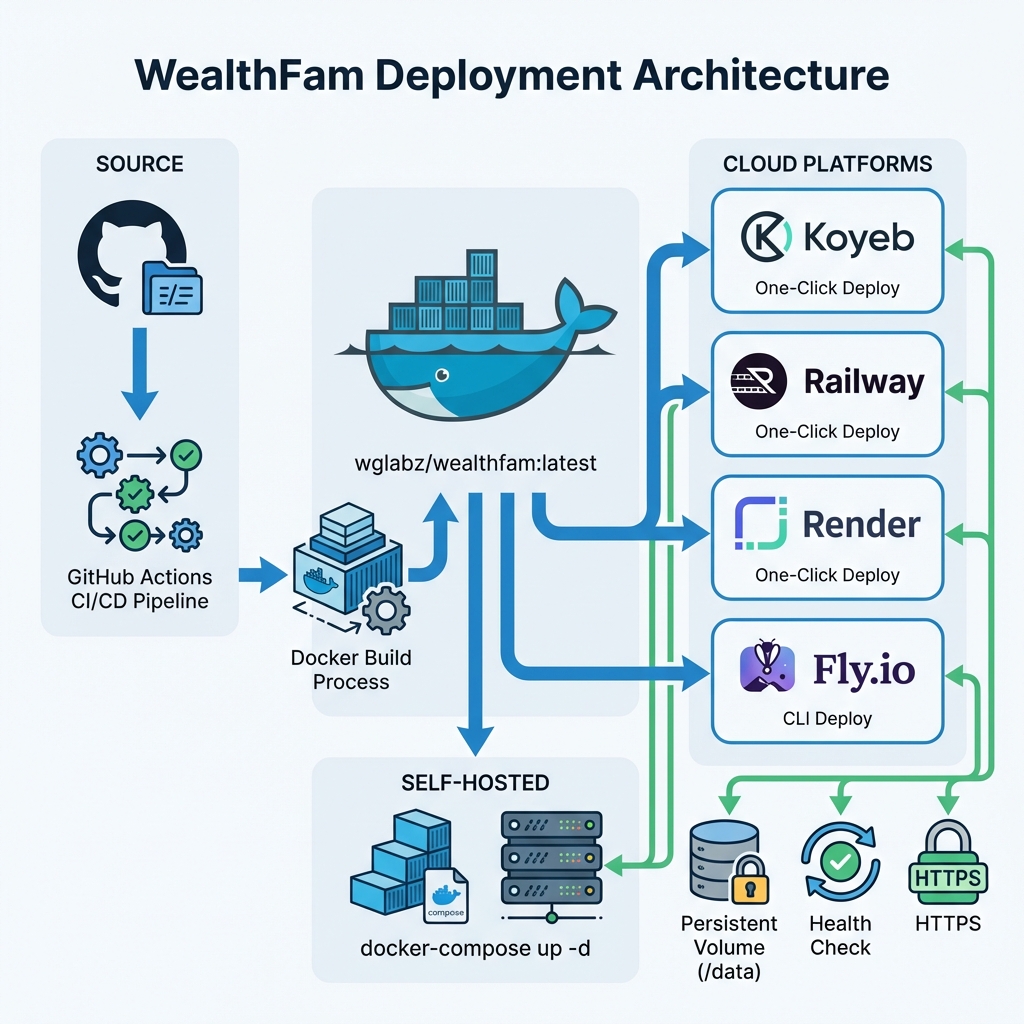
Fly.io
Quick Deploy:
bash
# Install flyctl
curl -L https://fly.io/install.sh | sh

# Login
flyctl auth login

# Clone and deploy
git clone https://github.com/WealthFam.git
cd wealthfam
flyctl launch

# Create persistent volume
flyctl volumes create wealthfam_data --size 1

# Deploy
flyctl deploy
Features:
- Free tier (3 shared-cpu VMs)
- Global deployment
- Fast cold starts
- Built-in metrics
🐳 Self-Hosted Docker
For complete control, run WealthFam on your own hardware:
bash
# Pull the latest image
docker pull wglabz/wealthfam:latest

# Create docker-compose.yml
cat > docker-compose.yml << 'EOF'
version: '3.8'
services:
  wealthfam:
    image: wglabz/wealthfam:latest
    container_name: wealthfam
    restart: unless-stopped
    ports:
      - "80:80"
    volumes:
      - ./data:/data
    environment:
      - DATABASE_URL=duckdb:////data/family_finance_v3.duckdb
EOF

# Start the application
docker-compose up -d

# View logs
docker-compose logs -f
Access: Open http://localhost in your browser
🌐 Live Demo
Demo Instance: https://wealthfam.onrender.com
Test Credentials:
- Username:
demo@demo.com - Password:
demo123
⚠️ Note: Runs on Render Free Tier. May maintain cold start delay (~50s). Data is ephemeral.
⚙️ Environment Variables
All platforms support these optional environment variables:
| Variable | Default | Description |
|---|---|---|
DATABASE_URL | duckdb:////data/family_finance_v3.duckdb | Database connection string |
PORT | 80 | HTTP port (some platforms override this) |
VITE_APP_BUILD | 0000 | Build identifier for frontend |
GEMINI_API_KEY | - | Google Gemini API key for AI features |
SECRET_KEY | Auto-generated | JWT secret key |
📊 Platform Comparison
| Platform | Free Tier | Deploy Time | Difficulty | Best For |
|---|---|---|---|---|
| Koyeb | ✅ Yes | ~3 min | ⭐ Easy | Quick demos |
| Railway | ✅ $5/mo | ~2 min | ⭐ Easy | Hobby projects |
| Render | ✅ Yes | ~5 min | ⭐⭐ Medium | Production apps |
| Fly.io | ✅ Yes | ~4 min | ⭐⭐ Medium | Global apps |
| Docker | N/A | ~1 min | ⭐⭐⭐ Advanced | Full control |
🔧 Post-Deployment Setup
After deployment:
- Access your instance at the provided URL
- Create your account - First user becomes admin
- Configure settings:
- Set up email sync (optional)
- Add your Gemini API key for AI features
- Configure family members
- Start adding transactions!
📱 Mobile App Setup
After deploying, configure the mobile app to connect to your instance:
- Download the WealthFam Mobile APK
- Install on your Android device
- Open Settings → Backend Configuration
- Enter your deployment URL (e.g.,
https://your-app.koyeb.app) - Login with your credentials
🆘 Troubleshooting
Database Not Persisting
- Ensure the
/datavolume is properly mounted - Check platform-specific persistent storage configuration
Health Check Failing
- Visit
https://your-app-url/healthto see detailed status - Check if database volume has write permissions
Build Errors
- Ensure repository is public or platform has access
- Check Dockerfile build logs for specific errors
Performance Issues
- Consider upgrading to a paid tier for more resources
- Check if you need to increase volume size
🔐 Security Recommendations
- Change default credentials immediately
- Enable HTTPS (most platforms do this automatically)
- Set strong SECRET_KEY environment variable
- Regular backups of the
/datadirectory - Keep your instance updated to the latest version
📚 Additional Resources
- Main README - Full documentation
- GitHub Issues - Report bugs
- Contributing Guide - Help improve WealthFam
💬 Need Help?
- 📧 Email: support@wealthfam.app
- 💬 Discord: Join our community
- 🐛 Issues: GitHub Issues
Deploy your instance today and take control of your finances! 🎉